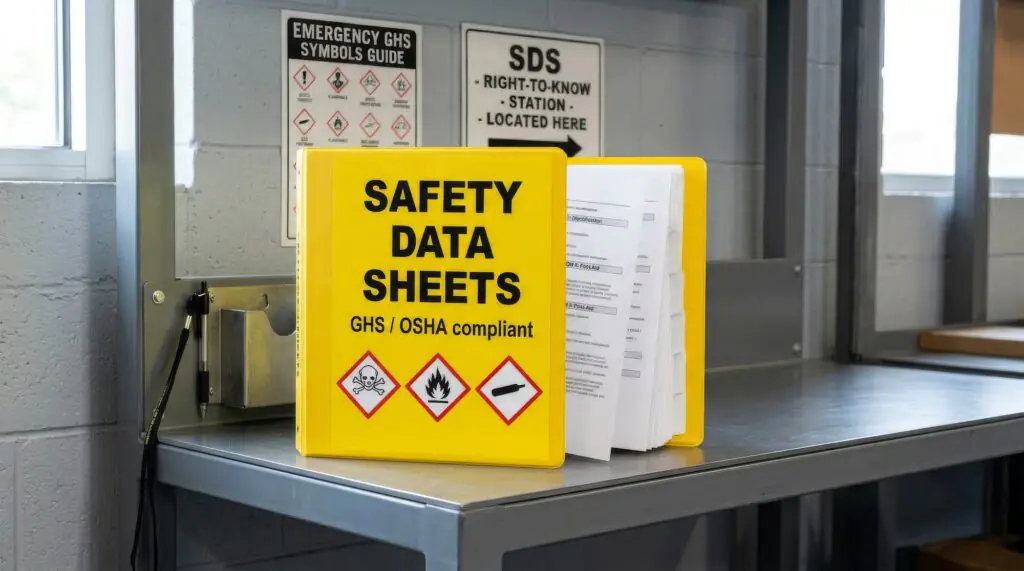
An OSHA inspector asks to see the current Safety Data Sheet for a chemical on the shop floor. At an organization still managing SDSs through binders or a shared drive, that request turns into ten or fifteen minutes of searching, sometimes longer if the file was renamed, moved, or never updated when the supplier revised the product. That delay is a compliance gap by itself. OSHA’s Hazard Communication Standard requires SDSs to be readily accessible to employees during each work shift, and Hazard Communication has consistently ranked among OSHA’s most frequently cited standards for general industry, with accessibility and documentation gaps as a recurring theme.
SDS management software exists to close that gap, but the value goes well beyond replacing a binder with a PDF folder. The real benefits show up in how quickly a team can act on the information, how consistently it’s maintained across sites, and how well it holds up under audit. We’ve covered the broader shift from paper to digital SDS management elsewhere, including why moving to digital matters for workplace safety and the general case for digitizing Safety Data Sheets. This piece focuses specifically on what a dedicated SDS management platform solves that a basic digital file system doesn’t.
What Problems Does SDS Management Software Actually Solve?
| Problem | Impact of the Manual or Fragmented Approach | How Software Addresses It |
| SDSs stored across binders, shared drives, or site-specific folders | Slow retrieval during inspections and emergencies | Single searchable library accessible from any location |
| Outdated SDS versions still in circulation | Employees reference hazard information that’s no longer accurate | Automatic revision tracking and version history |
| No access during a network or system outage | SDS becomes unreachable at the exact moment it’s needed most | Offline and mobile access at the point of use |
| Inconsistent access across facilities | Some sites have current SDSs, others don’t | Centralized library with role-based access for every location |
| Manual chemical inventory reporting | Time-consuming reconciliation before EPCRA Tier II deadlines | Inventory and reporting tied directly to the SDS library |
What Are the Core Benefits of SDS Management Software?
- Centralized, searchable access. Every SDS lives in one system rather than scattered across sites, drives, and departments, which turns a fifteen-minute search into a lookup that takes seconds.
- Mobile and offline access. Floor-level employees and emergency responders can pull an SDS from a phone or tablet even without a live network connection, which matters most during the exact situations where SDS access is time-sensitive.
- QR code and secondary container labeling. Posting a QR code near chemical storage lets anyone scan their way directly to the current SDS, without needing to know a product name, a file location, or a login.
- Automatic revision tracking. When a supplier updates an SDS, the platform reflects the change and keeps a version history, so there’s a defensible record of what was on file at any point in time.
- Support for alternative product names. Chemicals purchased under multiple trade names from different suppliers are tracked as the same underlying product, which prevents duplicate or missing records.
- Unlimited users with role-based administration. Site-level staff can access and update what’s relevant to their location, while regulatory affairs retains oversight across the full organization.
- Integrated chemical inventory and reporting. Inventory quantities, hazard classifications, and EPCRA Tier II threshold status stay connected to the SDS itself, instead of living in a separate spreadsheet.
- Multi-location management from one account. A single administrator can manage SDS libraries across every facility rather than maintaining separate systems per site.
How Does SDS Management Software Improve Audit and Inspection Readiness?
Audit readiness depends on being able to answer three questions immediately: what’s the current SDS for this chemical, when was it last updated, and who has access to it. Manual systems make all three questions harder to answer quickly, because the information is scattered and the update history often isn’t tracked at all.
A centralized platform keeps those answers attached to the record itself. Revision history shows exactly when a document changed, access logs show who retrieved it and when, and the searchable library means an inspector’s request gets answered in the room rather than after a delay that itself becomes part of the finding. This is closely related to the risks covered in our guide on reducing compliance risk through accurate SDS authoring, since an accurate SDS that nobody can find quickly still creates exposure.
Manual SDS Storage vs. SDS Management Software: What’s the Difference?
| Manual or Fragmented Storage | Dedicated SDS Management Software | |
| Retrieval speed | Minutes to search across folders, binders, or sites | Seconds, via search or QR code scan |
| Version accuracy | Depends on someone manually replacing the old file | Automatic revision tracking with full history |
| Access during outages | Often unavailable if it depends on network access | Offline and mobile access built in |
| Multi-site consistency | Varies by facility and by who maintains the files | Centralized library with role-based access everywhere |
| Chemical inventory linkage | Maintained separately, prone to drift | Tied directly to inventory and reporting |
| Audit response time | Reactive, assembled under pressure | Immediate, since records are already organized |
What Return Can Organizations Expect from SDS Management Software?
The return on an SDS management platform shows up in a few consistent places rather than a single number, since the impact depends heavily on the size and complexity of the organization:
- Time saved on retrieval and reconciliation. Less time spent searching for documents or rebuilding inventory records manually before a filing deadline.
- Reduced compliance exposure. Fewer instances of missing, outdated, or inaccessible SDSs, which are among the specific gaps OSHA inspectors look for during HazCom reviews.
- Lower risk during emergencies. First responders and employees can access hazard information immediately, rather than during a search that delays an appropriate response.
- Easier scaling across new sites or acquisitions. Adding a new facility to an existing centralized system is faster than standing up a parallel manual process from scratch.
Organizations weighing this decision often find it useful to review real implementation outcomes. Our case studies walk through how different organizations approached the transition.
Where Does SDS Management Software Fit Alongside SDS Authoring?
SDS management and SDS authoring solve related but distinct problems. Authoring software governs how a Safety Data Sheet gets created and classified in the first place. Management software governs how that finished SDS gets stored, accessed, and kept current across an organization. Companies that both author and manage their own SDS library generally see the most value when the two are connected, since a newly authored or revised SDS flows directly into the management platform without a manual upload step.
TotalSDS by Enhesa offers both as part of one platform: SDS Author for classification and document creation, and SDS Manager for centralized library access, chemical inventory, and multi-site administration. Organizations that only need one side of that workflow, such as companies that don’t author their own SDSs but need to manage supplier-provided documents, can also start with SDS Manager alone.
Key Takeaways
- OSHA’s Hazard Communication Standard requires SDSs to be readily accessible to employees, and HazCom remains one of the most frequently cited standards in general industry.
- SDS management software solves problems a basic digital file system doesn’t: revision tracking, offline access, alternative product name matching, and integrated chemical inventory reporting.
- Audit readiness depends on answering what’s current, when it changed, and who can access it, all of which a centralized platform tracks automatically.
- Return on investment shows up as time saved, reduced compliance exposure, faster emergency response, and easier scaling across new sites.
- SDS management and SDS authoring are complementary. Connecting the two removes the manual step of uploading newly authored SDSs into a separate library.
Frequently Asked Questions About SDS Management Software
What does SDS management software actually do? SDS management software centralizes an organization’s Safety Data Sheets into one searchable, accessible system, with features like revision tracking, mobile and offline access, chemical inventory integration, and role-based administration across multiple sites.
Is SDS management software required by OSHA? OSHA doesn’t require a specific software platform, but it does require that SDSs be readily accessible to employees during their work shift. Software is one common way organizations meet that requirement reliably, especially across multiple locations.
How is SDS management software different from SDS authoring software? SDS authoring software is used to classify chemicals and create the Safety Data Sheet itself. SDS management software is used to store, organize, and provide access to SDSs once they exist, whether they were authored internally or provided by a supplier.
Can SDS management software work offline? Yes. Many platforms, including TotalSDS by Enhesa’s SDS Manager, provide offline and mobile access, so employees and emergency responders can retrieve an SDS even without an active network connection.
Does SDS management software help with EPCRA Tier II reporting? Yes, when the platform ties chemical inventory data directly to the SDS library. That connection keeps quantities, hazard classifications, and reporting thresholds current without requiring a separate manual reconciliation process.
Ready to Consolidate Your SDS Library into One System?
Manual or fragmented SDS storage creates the same problem in every organization eventually: the information exists, but it isn’t reliably accessible when someone actually needs it. TotalSDS by Enhesa’s SDS Manager centralizes your SDS library, chemical inventory, and multi-site access in one platform, with mobile and offline availability built in.
See how it fits your organization’s SDS authoring and management workflow together by exploring SDS Manager and SDS Author, or review our case studies to see how other organizations made the switch.